AI Assistant Runtime Interaction Architecture
學習目標
完成本章節後,你將能夠:
- 追蹤一次 Chatbot Request 的完整執行順序。
- 說明
session_id、History、System Instruction 與網站內容的用途。 - 理解 Gemini 回覆與 Firestore 紀錄的成功及錯誤路徑。
- 辨識 Browser、Cloud Run 與 Firestore 的 State Boundary。
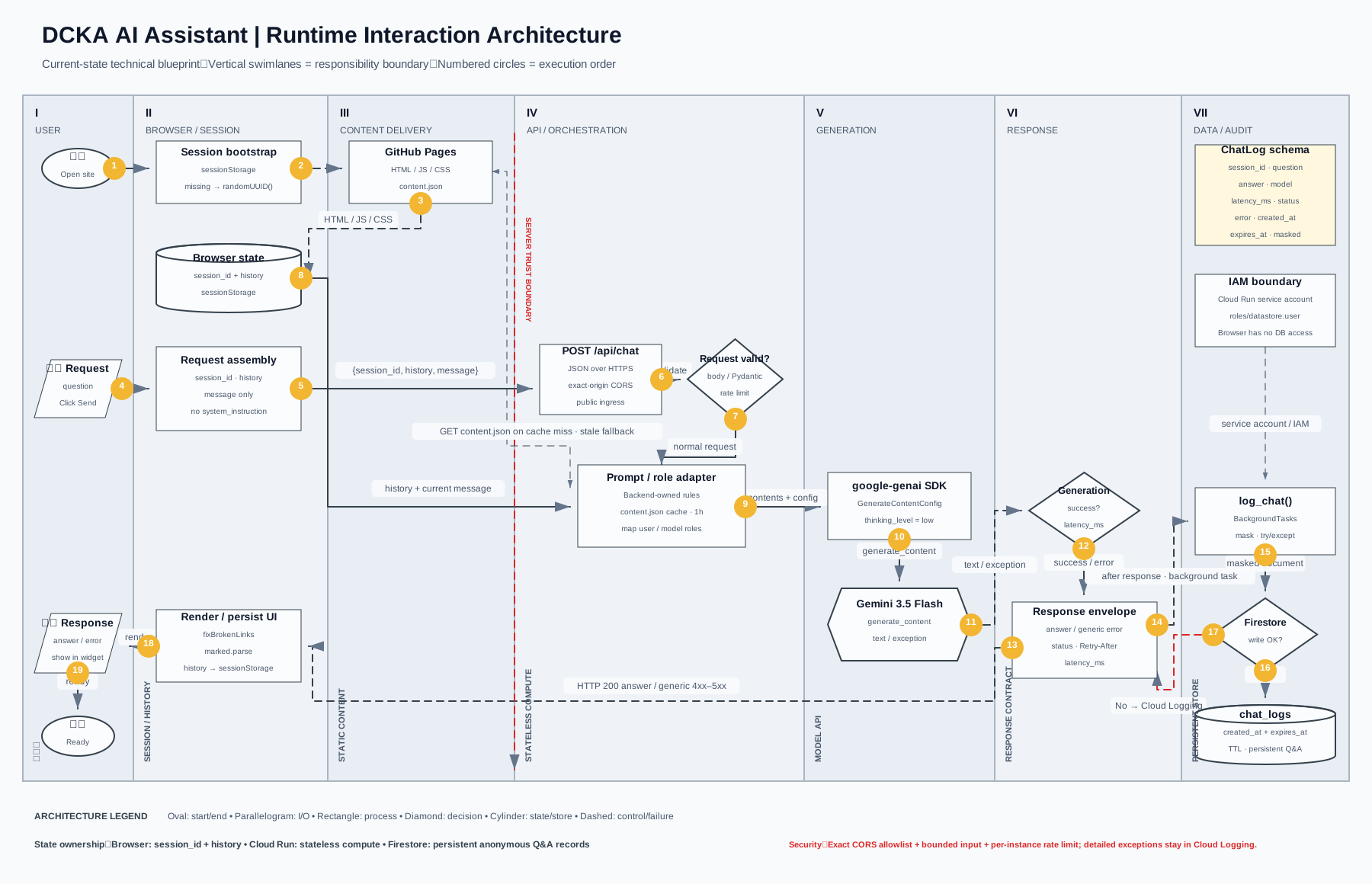
端到端執行流程
| 步驟 | 執行位置 | 行為 |
|---|---|---|
| 1–3 | Browser/GitHub Pages | 建立匿名 Session 並下載網站 UI 資源 |
| 4–5 | User/Browser | 接收問題,只組合 session_id、History 與 Message |
| 6–8 | Cloud Run/FastAPI | 驗證 Origin、Body、額外欄位與 Rate Limit,按需快取 content.json 並組合受控 System Instruction |
| 9–11 | google-genai/Gemini | 建立 Generation Config,呼叫模型並取得 Text 或 Exception |
| 12 | Response Lane | 判斷成功或錯誤並計算 latency_ms |
| 13 | FastAPI/Browser | 先送出 HTTP 200 回答或一般化 4xx/5xx 錯誤 |
| 14–17 | FastAPI/Firestore | BackgroundTasks 遮罩並建立 Log Record;寫入失敗只進 Cloud Logging |
| 18–19 | Browser/User | 渲染 Markdown、保存 History 並顯示結果 |
API Request Contract
Browser 呼叫 POST /api/chat 時,主要 Request 結構如下:
{
  "session_id": "browser-generated-uuid",
  "history": [
    {
      "role": "user",
      "parts": [{ "text": "上一個問題" }]
    },
    {
      "role": "bot",
      "parts": [{ "text": "上一個回答" }]
    }
  ],
  "message": "這次的新問題"
}
system_instruction 不是公開欄位;Browser 若傳入該欄位會收到一般化 HTTP 422。固定回答規則、信任邊界與完整網站內容只由 Backend 組合。
成功時 Backend 回傳:
模型或 Backend 發生錯誤時,FastAPI 只會回傳一般化 HTTP 500/503 detail;完整例外與 stack trace 留在 Cloud Logging。
Browser Session 不是登入身分
session_id 由 Browser 使用 crypto.randomUUID() 產生,並保存在 sessionStorage。它只用於把同一次 Browser 對話串在一起:
- 不包含姓名、帳號或 Email。
- 不驗證使用者身分。
- 清除聊天紀錄時會產生新的
session_id。 - 不應當作 Authentication Token 或 Authorization 依據。
Firestore ChatLog Schema
每次問答會嘗試在 chat_logs Collection 新增一筆 Document:
{
  "session_id": "browser-generated-uuid",
  "question": "使用者問題",
  "answer": "模型回答或 null",
  "model": "gemini-3.5-flash",
  "latency_ms": 1731,
  "status": "success 或 error",
  "error": "例外類型或 null",
  "created_at": "SERVER_TIMESTAMP",
  "expires_at": "建立時間 + 90 天"
}
Failure Isolation
同步 Firestore Client 由 FastAPI BackgroundTasks 在 HTTP Response 送出後執行,並由 try/except 隔離失敗。問題與回答寫入前會遮罩 Email、手機、台灣身分證字號、付款卡號與常見 Secret。
Retention 與查閱權限
每筆文件都包含 expires_at,預設保留 90 天;Firestore chat_logs.expires_at TTL policy 已啟用並為 ACTIVE。Cloud Run 使用 roles/datastore.user 寫入;若要開放其他人查閱,管理者應透過專用群組取得唯讀 roles/datastore.viewer,一般網站使用者不具 Firestore 權限。
線上驗證結果
2026-08-19 使用正式 GitHub Pages Origin 進行端到端驗證:
| 驗證項目 | 結果 |
|---|---|
| Cloud Run Health Check | HTTP 200 |
| 正式 Origin CORS Preflight | HTTP 200,回傳 access-control-allow-origin: https://caocharles.github.io |
| 未授權 Origin | HTTP 400 |
POST /api/chat |
HTTP 200;首次教材載入約 5.60 秒,快取命中約 3.30 秒 |
| Prompt Ownership | Browser 不傳 Prompt;夾帶 system_instruction 時 HTTP 422 |
| 教材 Cache | Cloud Logging 僅出現一次 refresh;第二次請求沿用一小時快取 |
Firestore chat_logs |
成功寫入 session_id、Model、Latency、Status 與時間戳 |
| Firestore TTL | chat_logs.expires_at 為 ACTIVE,驗證紀錄建立 90 天後到期時間 |
測試資料
本輪線上部署驗證建立兩筆匿名問答紀錄;它們與一般訪客紀錄採相同遮罩及 90 天 TTL 規則,不包含登入身分。
Security Boundary
GEMINI_API_KEY只存在 Cloud Run Runtime Environment。- System Prompt 的執行控制權位於 Backend;Repository 原始碼仍是公開的,但 API Client 無法傳入或覆寫
system_instruction。 - Backend 按需下載約 287 KiB 的
content.json,每個 Cloud Run instance 預設快取一小時;沒有聊天請求時不會產生下載流量。 - Browser 不會直接連線 Firestore。
- Cloud Run 使用專用
dcka-chatbot-runtimeService Account,透過roles/datastore.user存取 Firestore。 - Cloud Run Compute 維持 Stateless,Persistent State 由 Firestore 保存。
- CORS 只允許正式 GitHub Pages 與 localhost;單次 request 及 history 皆有上限。
- Rate limiting 目前是單一 Cloud Run instance 記憶體內計數,不等同全域配額。
目前不是 Retrieval RAG
Backend 仍會把完整 content.json 放入 System Instruction,而不是先使用 Vector Database 擷取相關片段。這次搬移改善 Prompt 控制權與 Browser Request 大小,不會降低 Gemini Token 用量;網站文章持續增加時,應評估 Token、Latency 與 Retrieval Architecture。