Frontend & Backend Delivery Architecture
學習目標
完成本章節後,你將能夠:
- 說明 Frontend 與 Backend 為什麼使用兩條獨立 Delivery Pipeline。
- 描述 MkDocs、GitHub Pages Artifact、GitHub Actions、Cloud Build 與 Cloud Run 的責任。
- 辨識 Source、Build Artifact、Runtime Secret 與 Persistent Dependency。
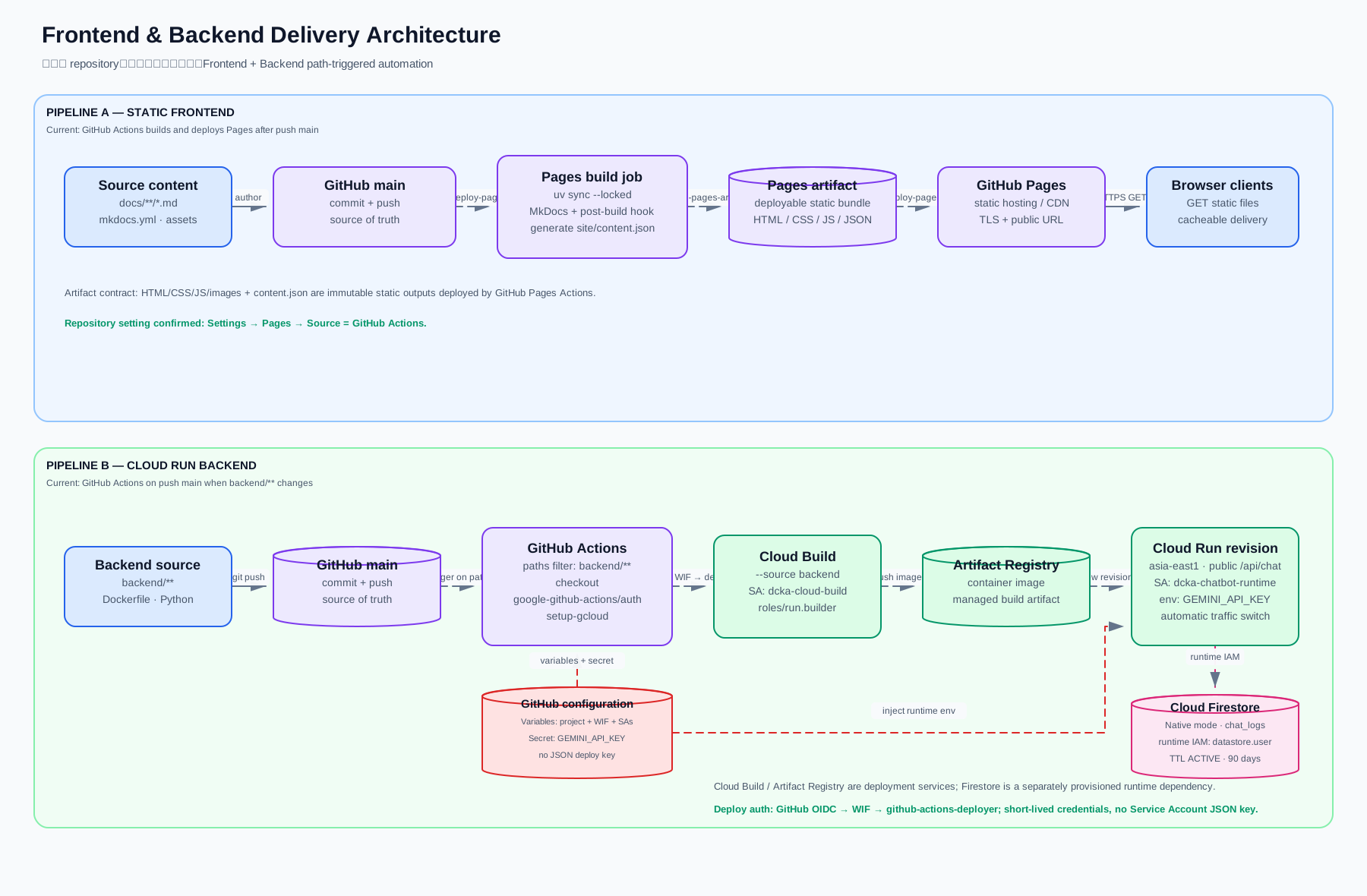
Pipeline A:Static Frontend
Frontend 由 MkDocs 將 Markdown 轉換成可直接由 Browser 讀取的靜態檔案。
| 階段 | 輸入 | 輸出 |
|---|---|---|
| Source Content | docs/**/*.md、mkdocs.yml、Assets |
網站原始內容與設定 |
| Trigger | Push main 且網站相關檔案變更 |
啟動 .github/workflows/deploy-pages.yml |
| Build | uv sync --locked、uv run mkdocs build |
HTML、CSS、JavaScript、圖片與 content.json |
| Publish | upload-pages-artifact、deploy-pages |
GitHub Pages Artifact 與正式網站 |
| Delivery | GitHub Pages | HTTPS Public Website |
Static Artifact Contract
Pages Artifact 是建置完成的 HTML、CSS、JavaScript、圖片與 content.json,不是開發者在 main Branch 編輯的 Markdown 原始碼。目前 Source 為 GitHub Actions;mkdocs gh-deploy 只有在 Source 暫時切回 branch-based deployment 時才可使用。
Repository 設定已完成
Settings → Pages → Build and deployment → Source 已選擇 GitHub Actions,deploy-pages.yml 接管正式發布。
Pipeline B:Cloud Run Backend
Backend 由 GitHub Actions 監看 backend/**,再交給 Google Cloud 建置與部署。
| 階段 | 元件 | 主要行為 |
|---|---|---|
| Trigger | GitHub Push to main |
只有 backend/** 變更才觸發 Workflow |
| Authentication | GitHub OIDC/WIF/Deployer Service Account | 取得短效 Google Cloud Deployment 權限 |
| Build | Cloud Build/dcka-cloud-build |
以 roles/run.builder 依 backend/Dockerfile 建置 Container Image |
| Artifact | Artifact Registry | 保存可部署的 Versioned Image |
| Runtime | Cloud Run | 建立 Revision 並將 Traffic 切換到新版本 |
| Persistence | Firestore | 由 Cloud Run Runtime IAM 寫入 chat_logs |
Secrets 與 IAM
GCP_PROJECT_ID、GCP_WIF_PROVIDER、GCP_DEPLOYER_SA、GCP_BUILD_SA、GCP_RUNTIME_SA:GitHub Actions Variables。GEMINI_API_KEY:GitHub Secret,部署時注入 Cloud Run Runtime Environment。CONTENT_URL與DOCUMENT_CACHE_SECONDS=3600:Backend Workflow 的非敏感 Runtime 設定;Cloud Run 按需取得 Pagescontent.json。- Workload Identity Provider:只接受
CaoCharles/dcka-class-notes的mainbranch OIDC assertion。 github-actions-deployer:取得部署所需的roles/run.sourceDeveloper與roles/serviceusage.serviceUsageConsumer。dcka-cloud-build:以roles/run.builder執行 source deploy 的建置工作;deployer 只能以roles/iam.serviceAccountUser使用此身分。dcka-chatbot-runtime:以roles/datastore.user寫入 Firestore。
無長效 GCP 部署金鑰
GitHub Actions 已改用 Workload Identity Federation,不再保存 GCP_SA_KEY。每次 workflow 由 GitHub OIDC 換取短效憑證,再 impersonate 專用部署帳號。
2026-08-19 線上驗證完成
GitHub Pages 與 Cloud Run Actions 均部署成功;Cloud Run revision dcka-chatbot-backend-00007-p7b 使用 dcka-chatbot-runtime 並承接 100% 流量。正式 Origin CORS、Backend-owned Prompt、教材快取、Gemini 問答、Firestore 寫入與 expires_at TTL ACTIVE 均已完成端對端驗證。
兩條 Pipeline 的差異
| 比較項目 | Static Frontend | Cloud Run Backend |
|---|---|---|
| Artifact | HTML/CSS/JS/JSON | Container Image |
| Hosting | GitHub Pages | Google Cloud Run |
| Current Trigger | Push main 且網站相關檔案變更 |
Push main 且 backend/** 變更 |
| Runtime Secret | 無 | GEMINI_API_KEY |
| Persistent Dependency | 無 | Firestore |
兩條 Workflow
deploy-pages.yml 建置並發布 MkDocs;deploy-backend.yml 建置並部署 Cloud Run。兩者使用 paths filter,只有對應範圍變更時才執行。